 Table of Contents
Table of Contents
Table of Contents
The nudge increment is a measure of how far the follower moves each time a nudge arrow is selected.
NOTE: The leader and follower are able to set distinct nudge increment values.
|
Change Forward / Backward nudge increment. |
|
|
Change Left / Right nudge increment. |
|
|
Select to enable In-Field Data Sharing. |
|
Speed Sensitivity determines how aggressively the follower speeds up and slows down to match leader speed.
Higher Settings: Result in more aggressive speed changes. Setting the value too high may result in cyclical speeding up and slowing down when the leader is at a constant speed.
Lower Settings: Result in less aggressive speed changes. Setting the value too low may result in a sluggish response to changes in leader speed.
Speed Sensitivity Recommendations
6, 7, and 8 Series Tractors with a PST transmission - Start with speed sensitivity set to 1 to reduce speed surging.
Tractors with either IVT or PST transmissions - Set AutoTrac Line Sensitivity - Heading to 50 to reduce S-ing.
NOTE: These speed sensitivity settings are a recommended starting point. Performance may vary between machines. Make any necessary adjustments to optimize machine performance.
|
Increase speed sensitivity. |
|
|
Decrease speed sensitivity. |
|
When audible alarms are enabled, an audio tone plays for both the leader and the follower when the follower is nudged or when the home point is set.
NOTE: Leader and follower enable alarms separately.
|
Enable audible alarm. |
|
|
Edit Networks - View and edit networks. |
|
|
When operating a tractor, select the radio button that describes the role of the tractor:
|
|
When controlled traffic mode is enabled, the follower travels on a guidance line while its speed is controlled by the leader. If the home point is not on the guidance line, the follower travels parallel to the home point while remaining on the guidance line.
|
Toggle Controlled Traffic Mode ON and OFF. |
ON / OFF |
When using controlled traffic mode, select the AutoTrac resume switch once to track on the active guidance line. When the follower is in the operational zone, select the AutoTrac resume switch again to synchronize speed with the leader.
NOTE: When controlled traffic mode is enabled, left and right nudges are disabled.
When saved nudges are enabled and a follower returns to the operational zone, the follower returns to where it was nudged rather than the original home point.
|
Toggle Save Nudges for Next Connection ON or OFF. |
ON / OFF |
When multiple home points are enabled, the operator can use up to three different home points.
|
Toggle Multiple Home Points ON or OFF. |
ON / OFF |
|
Operational Zone Front Edge - Enter the distance from the receiver on the leader to the front edge of the operational zone. Default value is 25 m (82 ft). |
Operational Zone Front Edge |
|
Operational Zone Back Edge - Enter the distance from the receiver on the leader to the back edge of the operational zone. Default value is 20 m (65.6 ft). |
Operational Zone Back Edge |
|
|
|
|
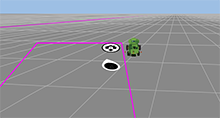
Left-Hand Operational Zone |
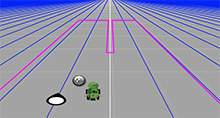
U-Shaped Operational Zone |
When the machine type is set to Combine, Harvester, or Other in Equipment Manager, Machine Sync defaults to a left-hand operational zone. All other machine types default to a U-shaped operational zone. When the U-shaped operational zone override is ON, the operational zone is U-shaped. When the U-shaped operational zone override is OFF, the operational zone is on the left-hand side of the machine only.
|
Toggle U-Shaped Operational Zone Override ON or OFF. |
ON / OFF |
NOTE: If the leader is a combine, the U-shaped operational zone override toggle is grayed out.
Operational Zone Interior Width determines the width of the indented part of the U-shaped operational zone.
Operational Zone Interior Length determines the length of the indented part of the U-shaped operational zone.